.png?width=512&height=100&name=Logo%20(side-by-side).png)
Care Recipient 360 Page
The Care Recipient 360 Page in the Support at Home module provides a complete view of a care recipient’s profile. It is designed to give providers a one-stop dashboard for managing each care recipient’s information and tracking all related financial and service activities.
Accessing the Care Recipient 360 Page
-
Navigate to the Support at Home module from the left hand side panel, click on it and a dropdown appears.
-
Click on the Care Recipients 360 tab.
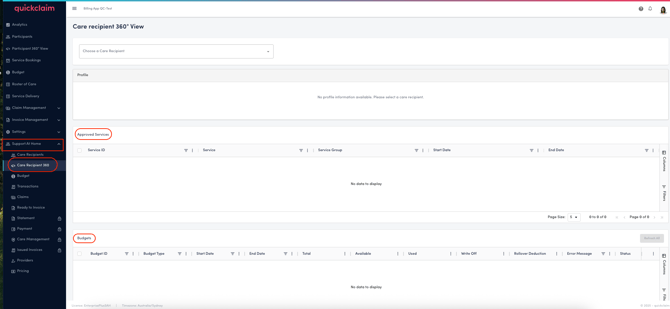
Information of a specific care recipient can be viewed by selecting the care recipient in the drop-down. It is associated with a status when selected. The status reflects how closely the provider’s entry of the care recipient information matches the official data in Services Australia.
| Status | Description |
|---|---|
| SYNCED | The care recipient record in quickclaim exactly matches the record from Services Australia. This includes an identical care recipient ID, first name, last name, and date of birth. |
| MISMATCH | The care recipient ID exists in Services Australia, but one or more fields (such as name or date of birth) do not match exactly. This may indicate a data entry error that should be reviewed. |
| NOT FOUND | The care recipient ID entered by the provider does not exist in Services Australia. This could happen if the ID was entered incorrectly or if the care recipient has not been registered in the Services Australia system. |
Care Recipient 360 View
1. Profile Information
In order to view the personal and program details of a care recipient, the care recicipient must be chosen from the drop down at the top. Once selected the profile details include:
-
Full and Preferred Name
-
Gender
-
Date of Birth (DD-MM-YYYY)
-
My Aged Care Gateway ID
-
SPARC ID
-
Care Recipient ID
-
Service Provider ID (Branch Association)
-
Active Status
Note:
In Support at Home, each care recipient must be linked to a specific branch (Service Provider). All transactions and claims for that recipient are processed under that branch’s ID.
2. Approved Services
Displays services that are approved for delivery under the care recipient’s plan.
Each entry includes:
-
Service ID
-
Service
-
Service Group (Any available list of groups?)
-
Start and end date
This list ensures providers only claim for services that are approved for that care recipient.
3. Budget Overview
Shows the care recipient’s current and historical budget information, including:
-
Total budget allocation
-
Budget type (e.g., Home Support, Assistive Technology, Home Modifications)
-
Used vs. available funds
-
Budget start and end dates
-
Last refresh date (shows when live data was last synced from Services Australia)
Note:
quickclaim stores historical budget data, so users can view budgets as of a specific date.
For example, users can check what the budget looked like on a previous Friday, even though the live data always reflects the most current status.
4. Supplement Entitlements
This section lists any supplement entitlements linked to the care recipient.
Supplements are additional entitlements approved by Services Australia for specific needs — for example, oxygen, continence pads, or other specialised supports.
-
Once a supplement entitlement is approved, payments are automatically processed by the government at regular intervals (weekly or monthly).
-
These automatic payments are captured in quickclaim under the care recipient’s record and appear as part of the ????????.
- This section provides information about the Supplement type, Start date, end date and its rate.
-
The system reconciles these payments with related transactions automatically, ensuring all entitlements are tracked accurately.
5. Assessments
This section records all assessments associated with the care recipient, including:
-
Assessment ID
-
ACAT ID
-
Approval date and end date
- Care type, sub type, level and status
- Assessment Status
- Time limited